Loading…
Free Excel template
Physical stock verification format in Excel
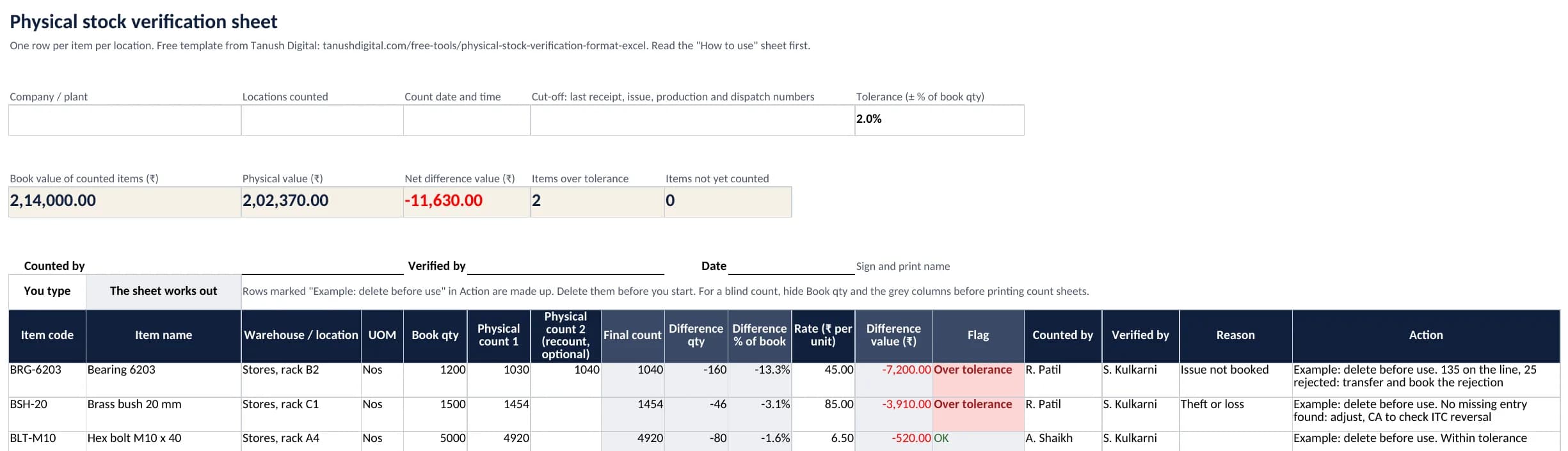
A free count sheet for stores and factories. Type the book quantity and the count, and it works out the difference in quantity, percentage and rupees, flags lines outside your tolerance and totals the result for sign-off.
Download the Excel file
physical-stock-verification-format.xlsx, 44 KB. Free, no sign-up.
What’s inside
White columns are for you to type. Grey columns hold the formulas, so the sheet works the rest out.
You type
| Column | What it holds |
|---|---|
| Item code and item name | As in your item master. |
| Warehouse / location | One row per item per location: stores, production floor, finished goods, quality hold, scrap. |
| UOM | The unit the book quantity is in. |
| Book qty | From your stock report as at the cut-off. Hide this column while counting. |
| Physical count 1 | What the count team found. |
| Physical count 2 | The recount, for lines outside tolerance. Leave it blank otherwise. |
| Rate | ₹ per unit, at cost. |
| Counted by and verified by | Names, line by line. |
| Reason | A dropdown: wrong unit, issue not booked, receipt not booked, at vendor or job worker, damaged or scrap, theft or loss, counting error, other. |
| Action | What you will do about the difference. |
The sheet works out
| Column | What it holds |
|---|---|
| Final count | The recount if there is one, otherwise count 1. |
| Difference qty | Final count minus book qty. |
| Difference % | As a percentage of the book qty. |
| Difference value | Difference qty times rate. |
| Flag | “Over tolerance” when the difference is more than the tolerance at the top (2% to start), or when stock turns up with no book quantity. |
| Totals at the top | Book value and physical value of the counted items, net difference value, items over tolerance, and items not yet counted. |
Also in the file
- Boxes for the company, locations, count date and the cut-off document numbers
- A sign-off block: counted by, verified by, date
- A tolerance setting, 2% to start
- Frozen header row, filters and number checks
- Print setup: A4 landscape, one page wide, header row on every page
- A “How to use” sheet on blind counting, cut-off, recounts and GST on lost stock
How to use it
- 1Fix the cut-off. Write the last receipt, issue, production and dispatch numbers in the box at the top, and hold movement until the count is done.
- 2Delete the example rows. Fill one row per item per location with the book quantity as at the cut-off.
- 3Hide Book qty and the grey columns, print the sheets, and count in pairs: one counts, one writes.
- 4Type the counts in. Recount every flagged line with a different team and type it in Physical count 2.
- 5Give every flagged line a reason and an action, then sign the block at the top.
Worked example: bearings short in stores
The books show 1,200 bearings in stores, rack B2, at ₹45 each. The first count finds 1,030, so a second team recounts and finds 1,040. The sheet shows:
| Column | Shows | Because |
|---|---|---|
| Final count | 1,040The recount replaces count 1 | The recount replaces count 1 |
| Difference qty | −1601,040 − 1,200 | 1,040 − 1,200 |
| Difference % | −13.3%−160 ÷ 1,200 | −160 ÷ 1,200 |
| Difference value | −₹7,200−160 × ₹45 | −160 × ₹45 |
| Flag | Over tolerance13.3% is more than the 2% tolerance | 13.3% is more than the 2% tolerance |
The flag sends someone to look before anything is written off. Here, 135 bearings had gone to the line without a transfer entry and 25 were rejected on the line and never booked. The fix is a transfer and a rejection entry, not a loss. With the other two example rows, the totals show a book value of ₹2,14,000, a physical value of ₹2,02,370 and a net difference of −₹11,630.
What it doesn’t do
- It doesn’t post anything to your books. The adjustment still goes through your accounting or ERP software.
- It doesn’t find the reason for a difference. That comes from checking receipts, issues, rejections and transfers.
- It doesn’t value stock for you. Type the rate at cost from your books.
- It doesn’t track batches or serial numbers. Add a column if you need one.
- It isn’t tax or accounting advice. How a loss is treated is for your CA to decide.
When the count needs to post itself
In ERPNext, a Stock Reconciliation posts the count. “Fetch Items from Warehouse” fills in each item with its current quantity and rate, you enter the counted quantity, and ERPNext shows the quantity and amount difference for each row and posts it to the Stock Adjustment account.
Warehouses can mirror the plant, so stock on the floor or at a job worker is not mistaken for a shortage in stores:
- Stores, production floor and finished goods
- A quality hold group with rejected, rework and scrap warehouses
- A warehouse for each job worker
- Negative stock switched off, so a missing entry stops on the day instead of turning up at the count
We walk your stores and floor with your team, set up warehouses that match, and help run the first count.
Frequently asked questions
Counting the stock actually present in every location, such as stores, the production floor, finished goods, quality hold and job workers, and comparing it with the stock in your books. Each difference is investigated, explained and then corrected.
No. Physical stock verification is the count. Stock reconciliation is matching that count with the books and posting the correction. Missing entries, wrong locations and duplicate items should be fixed first, so only real losses or gains go through as an adjustment.
Counting without seeing the book quantity, so the team writes down what is there rather than what is expected. In this sheet, hide the Book qty column and the grey columns before you print the count sheets.
There is no legal figure. The sheet starts at 2%: any line further from the book quantity gets a recount and a reason. For companies covered by CARO 2020, the auditor reports whether discrepancies of 10% or more in the aggregate for each class of inventory were found and properly dealt with.
Section 17(5)(h) of the CGST Act says input tax credit is not available on goods lost, stolen, destroyed or written off. If you claimed credit when you bought those goods, work out the reversal with your CA. Record the loss and its reason in your stock account, because goods you cannot account for can be taxed as if you had supplied them.
It is built for Microsoft Excel, and we checked that LibreOffice Calc calculates every formula the same way. Google Sheets has the same functions, but we have not tested the file there.
Sources
The legal points in the file were checked on these pages on 26 October 2026.
- CGST Act, section 17: blocked credits, including 17(5)(h), CBIC
- CGST Act, section 35: accounts and other records, including 35(6), CBIC
- CGST Rules, rule 56: maintenance of accounts, including stock accounts, CBIC
- Companies (Auditor’s Report) Order, 2020, paragraph 3, Income Tax Department
- ERPNext documentation: Stock Reconciliation, Frappe
- Physical stock verification: why stock and books never match, Tanush Digital blog
Get the file
A record-keeping aid, not tax advice. Check how a particular case is treated with your CA.
Download the Excel file
physical-stock-verification-format.xlsx, 44 KB. Free, no sign-up.
More free toolsWant this in ERPNext instead?
Book a walkthrough. We look at how your plant runs today and tell you plainly what would change.